GMKtec Mini PC Setup
The saga of the GMKtec Mini PC setup.
May 25th, 2026
Unboxed it and plugged in at my desk at Z-Space. Yep, that’s Windows 11 Decided to install Proxmox. Instructions for prepping a bootable USB drive for MacOS are very good.
Plugged it in, got into BIOS, booted it, and got started on installing. I didn’t blow away the windows partitions so figured I’d try installing overtop of the NVMe drive I have (that had Bazzite on it). Got stuck on network settings (don’t have a spare domain for this).
OK, I’m back to looking at Coolify and the newer Dokploy (that the Atmosphere Community Infra has on top of / with Proxmox). I stashed some links in a new Semble Homelab collection.
Ultimately, Dokploy is more like source-available, and their pricing is close to what I’m paying for Cloudron.
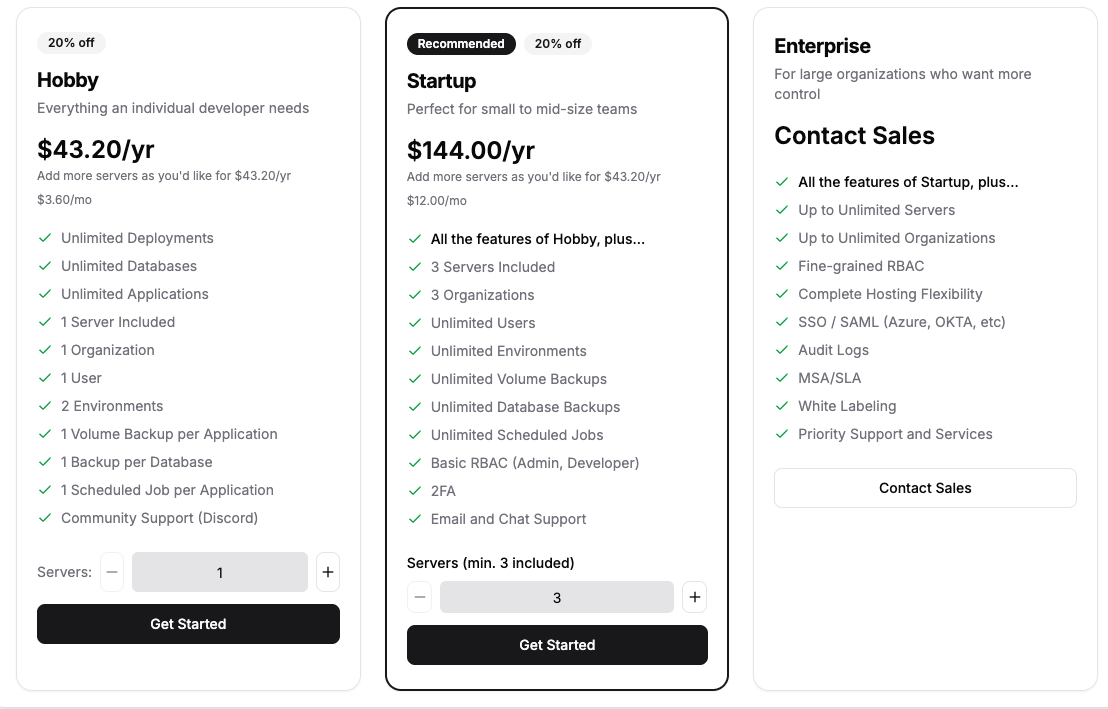
I have a hosted Coolify “cloud” dashboard that is $5/month for 2 servers, and $3 per additional server, and I have the option to self host that dashboard controller too.
Or do I just… install Ubuntu and go plain docker? Both Coolify and Dokploy use Docker Swarm to share apps and services across servers, and I find Swarmpit, added to Semble as well.
In the meantime, what else on Windows? Let’s install Steam and see if this is useful at all for running games natively.
I installed Titan’s Quest II and it is basically unplayable. Well, I figured as much. Everything is Crab plays great.
I’ll shrink the windows partition so I can install stuff on the main drive. Maybe I’ll dual boot?
Later that evening
I took the machine home, settled on running it as my home server, retiring Lenovo M900 Tiny.
I’m thinking maybe I will give Proxmox a try again. It does only support ethernet1, so I guess I’m going to do what I did with Lenovo m900 Tiny Setup and use a USB-C dock to share the Internet from my Macbook Air. Got it up and working in windows, so when I reboot, it should work.
Back to Proxmox install. Apparently it will nuke the entire internal drive. OK, let’s do it! I have no idea how to get a Windows license “back” when it just comes on your device?
There are options for a file system. I will choose the default ext4
Root password and email.
It has auto-detected DHCP, which is my internal network of 192.168.2.x
OK, I am immediately in the deep end with Proxmox Networking Configuration. I will leave it as pve.localdomain and leave it as the suggested private address.
OK! We are installed!
I am now continuing in the web gui. Login with root user/pass created earlier, which is also the root access to the linux system.
Create a bmann user in the GUI as Linux PAM, do some more reading, and then create a user of the same name in the shell. adduser add a password, and add sudo usermod -aG sudo. Apparently you CAN create gui only users by selecting the Proxmox VE Auth Server, and those users won’t be able to use ssh.
Then, Datacenter > Permissions > Add, and give that user PVEAdmin
Setup pubkey for my personal user, set ssh to just use keys.
Everything seems to be working, now to take it out and plug it into the router directly in the corner of the living room. Oops. 192.168.2.x was in fact the address it got from the bridged internet sharing from my Macbook.
Can I set up a VLAN for this port? Yes, let’s create a Proxmox VLAN using the UniFi interface (I have a UniFi Dream Machine aka UDM as my router behind a cable modem and Oxio as ISP).
I set this up as well as reviewed other settings I have, including previous port forwarding. I couldn’t get remote access to the server anymore. Something for tomorrow’s troubleshooting.
May 26th, 2026
OK, so I have a wireless keyboard and the USB-C portable monitor actually works with this server, so I can work with the box plugged into it directly while it is actually connected into Ethernet on the router.
Looking at Proxmox Network Configuration again, and how to configure the network from the command line.
nano /etc/network/interfaces
Changed everything from 192.168.2.x to 192.168.3.x, including /etc/hosts and /etc/resolve/conf.
To load changes, some combination of ifreload -a, ifupdown2, and rebooting the machine with shutdown -r now.
OK, so now, looks like the Dream Machine doesn’t actually route between VLANs? I do actually want high speed local connections when I’m inside my network, but I have to look at Traffic Policy Management more closely? And that the mobile app has less features than what is available
So, I properly reset port forwarding from the external public IP interface to route to the mini PC, and I can now connect to the Proxmox interface by looping out and back. Success???
OK, added some more links to my Semble, check the Proxmox and Tailscale collections for related, especially Tailscale on a Proxmox host so I can stop port forwarding that port past my router.
Brief interlude while I added BringYourOwn.Computer and Commons Computer domains to Tailscale and verified them.2
Was getting errors when trying to update Proxmox, turns out you have to turn off the subscriptions
In the WebUI, select the node, go to Updates > Repositories, disable the enterprise repository(s). Click Add and select “No-Subscription” from the drop down. Updates tab will now show updates.
Now run the Tailscale one liner to install (shell tab from the WebUI lets you do this remote) and tailscale up to connect the device. Oh yeah, and then tailscale up --advertise-exit node, which generated a bunch of warnings around forwarding not being setup properly.
Ran an update to update all the Debian and proxmox things.
Seems you installed a kernel update - Please consider rebooting this node to activate the new kernel.
Oh, and the server was able to deliver some email about “amd64-microcode”.
OK, let’s grab an ISO to make a VM, Ubuntu 26.04 LTS Server Edition looks fine.
Here we are, walking through Proxmox “Create VM” for the first time.
(screenshots)
Ok, now I can boot it and connected over the proxmox noVNC and run through the install steps of an ubuntu server. Using the grab-keys-from-Github and make my own username. And, we’re up!
Success! Got another 192.168.3.x IP allocated and I can see it in the Unifi console. I can connect to it through the proxmox shell (it’s on the same vlan).
Installed and added to Tailscale to it so it can be accessed from everywhere.
Now let’s try adding this to Coolify. Create a new private key. Grab the pubkey. Login and sudo -i for a root shell, and add to authorized keys.
OK, but the Cloud Coolify is not on the tailnet, so we can’t use that shortcut.
We have the separate issue of nothing being able to reach any of the other items on the VLAN / figuring out how to to do masquerading or whatever in order get domain based routing on one external IP.
tailscale up --accept-routes --advertise-routes=192.168.3.0/24 --advertise-exit-nodeEnable IP forwarding https://tailscale.com/docs/features/subnet-routers#enable-ip-forwarding
OK! So it looks like Nginx Proxy Manager is what I want, as an LXC running on the proxmox host, and have everything forwarded from my UDM to that container, which in turn will reverse proxy to everything else.
In part from learning about Community Scripts, which is an entire repo of bash one liners for proxmox!
As well as tailscale access, I setup a proxy host to the web interface for proxmox. Externally, it has a subdomain.bringyourown.computer, which then proxies to “internal IP address, port 8006”. One note: for the shell connection to work from the web ui, you need to turn on websocket support for the proxy.
OK, I deleted the other “manual” Ubuntu Server that I installed. Clearly I need to browse through the scripts.
Let’s do Navidrome!
May 27th, 2026
Spoiler, I stayed up late and installed Navidrome and uploaded my backup of Ampache music into it, learning how to resize disks on the fly. I guess music should be a volume? I might go back and experiment with that.
I can add subdomains (I’m using BringYourOwn.Computer as the base domain) as needed along with Nginx Proxy Manager for routing it to hosts in my private network.
I think I need to take a second look at the UDM setup and I can adjust firewall rules to route between VLANs…but also actually separating all the Proxmox hosts into their own VLAN is probably a good idea.
I think I’m pretty much done at this point. I can use Community Scripts to look up other formulas of things to run. I don’t think I’m going to setup Coolify, the Proxmox community scripts pretty much do stuff for me.
I’m not clear on what the update story is for Proxmox? That is, how do the operating systems and apps get kept up to date, which Cloudron does automatically for me? There’s this script PVE LXC Apps Update that appears to automate some of this.
I need to setup backup offsite. I have a Digital Ocean object store that I use for some stuff. Maybe I can talk to CoSocial abouting paying to use our OVH object store? That being said, I never did much with Lenovo M900 Tiny so didn’t bother doing backup.
Haven’t explored what it looks like to manage multiple hardware nodes. The MiniPC only has a 256GB drive, I think there’s a slot free where I can drop in an additional one or plugin a USB-C attached drive?
I have not yet been an active AI user as I focus on getting Local AI up and running. I ended up asking Claude Code some networking setup questions, so sharing this export of my session if you’re interested Proxmox Setup with Claude Code
Footnotes
-
OK, so technically you can make proxmox work with wifi but I’m not going to do that. ↩
-
TODO: switch from my
bmann.caGoogle login to Tailscale to atlogin ↩